










Insights
Malayalam Conversations, Culture & Stories
A curated long-form platform featuring leading voices from Malayalam culture and public
life.
This space is designed as an evolving storytelling archive where conversations go beyond
promotion and enter deeper narrative territory—exploring ideas, journeys, and identity
About this space
These voices bring together in-depth conversations with some of the most influential personalities in Malayalam public discourse.
It focuses on long-form dialogue, reflective storytelling, and meaningful exploration of
careers, creativity, technology and cultural context.
Rather than fragmented media appearances, each content is designed as a complete
narrative experience — structured around thought, emotion, and perspective.
Express Your Voice
This space is open to thoughtful suggestions, reflections, and creative input.
If there is a conversation worth having, a perspective worth exploring, or a story that
deserves attention, it can be shared here. This platform is built on conversations, ideas, and shared perspectives.
Whether it is feedback, collaboration, or a story worth exploring, every message is a part of shaping what comes next
Recommend your Content
Suggestions for interviews, personalities, or themes are welcome.
Recommendations help expand the depth and direction of future conversations.
Contact & Connect
We’re open to conversations, collaborations, and meaningful inquiries.
Choose the channel that works best for you.
Stay Connected
Follow for updates, insights, and new releases across platforms:
Send a Message
Frequently Asked Question - FAQs
How do I add Malayalam News Live to my iPhone home screen like an app?
You can install the website on your iPhone home screen using Safari. It behaves like an app
icon and opens the site instantly.
1. Open Safari and visit the website
Use Safari browser on your iPhone (this feature does not work in Chrome).
Go to: https://malayalamnewslive.com and wait for the page to load fully.

2. Tap the Share button
Look at the bottom of the screen click on 3 dots (…) and tap the square icon with an upward
arrow.

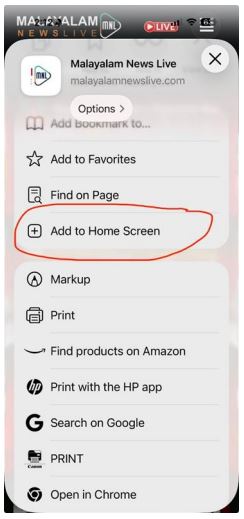
3. Select “Add to Home Screen”
Scroll through the share menu and tap Add to Home Screen.
4. Confirm
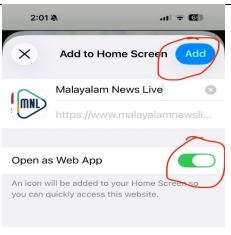
You can edit the name if needed, then tap Add in the top-right corner.
What happens after adding it?
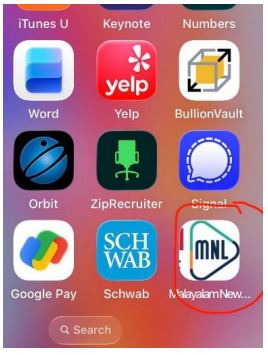
- The website appears as an app-style icon on your home screen
- It opens directly in full-screen mode
- No App Store installation required
- Always shows the latest live content from the website

Join Our WhatsApp Channel for Real-Time Alerts


